Published on
Content-driven & User-centered portfolio
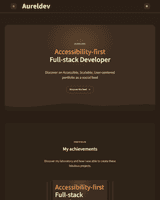
An accessible, scalable, user-centered portfolio as a social feed developed with Nuxt and Markdown
- Role
- Full-stack Developer
- Stack
- NuxtTypeScriptPiniaI18nFocus-trapResendUpstash/RedisMarkdownPrismaPostgreSQL
Context
Realizing that the first portfolio I created after completing my web development training no longer met my expectations, goals, or skill level, I set out to design a portfolio that prioritizes accessibility, content, and the user, while also serving as a testing ground for various technologies.
Problem
The main challenge was to start from scratch, with one idea in mind: a dynamic portfolio where I could regularly publish posts, because it’s not just a portfolio but a space for interaction between the user and me.
Solution
Using Nuxt with Nuxt Content and incorporating into this mix the Nuxt Studio CMS, a Markdown content editor developed by the Nuxt framework team, which recently became open-source.
Technical choices
- Nuxt 4 - A front-end framework that combines modernity, performance, scalability, and extensibility to meet current market needs.
- Nuxt Content + Nuxt Studio + Markdown - A fully functional Git-based Nuxt module and a CMS that supports Markdown content editing help streamline contnet management.
- Pinia - A global state management framework offering a lighter, modular and intuitive management approach to state management, all in a seamless and efficient manner.
- UI/UX moderne - A modern UX/UI strategy centered on the user, content, and interface accessibility to ensure an optimal, seamless, and accessible user experience.
Accessibility and UX
To optimize the user experience, I ensured the project's compliance with current accessibility guidelines (RGAA 4.2+ and WCAG 2.1) by conducting an accessibility audit (browser testing using onternal tools, screen reader testing, keyboard testing, visual and textual feedback during various actions, theme and language switching, contrast checks, creation of an accessibility report page, etc.), ensuring smooth and accessible navigation.
Learnings
Designing a modern full-stack architecture without external APIs to continuously improve the user experience.
Implementing the entire accessiblity audit process and addressing the complexities behind the term 'accessible website' to ensure the project complies with current regulations.
Analysis of user experience (UX) and digital accessibility aspects as part of a project to develop a scalable portfolio.